<div align="center">
<img src="https://pl-public-data.s3.amazonaws.com/assets_lightning/pytorch-lightning.png" width="400px">
**The lightweight PyTorch wrapper for high-performance AI research.
Scale your models, not the boilerplate.**
______________________________________________________________________
<p align="center">
<a href="https://www.pytorchlightning.ai/">Website</a> •
<a href="#key-features">Key Features</a> •
<a href="#how-to-use">How To Use</a> •
<a href="https://lightning.ai/docs/pytorch/stable/">Docs</a> •
<a href="#examples">Examples</a> •
<a href="#community">Community</a> •
<a href="https://lightning.ai/">Lightning AI</a> •
<a href="https://github.com/Lightning-AI/pytorch-lightning/blob/master/LICENSE">License</a>
</p>
<!-- DO NOT ADD CONDA DOWNLOADS... README CHANGES MUST BE APPROVED BY EDEN OR WILL -->
[](https://pypi.org/project/pytorch-lightning/)
[](https://badge.fury.io/py/pytorch-lightning)
[](https://pepy.tech/project/pytorch-lightning)
[](https://anaconda.org/conda-forge/pytorch-lightning)
[](https://hub.docker.com/r/pytorchlightning/pytorch_lightning)
[](https://codecov.io/gh/Lightning-AI/pytorch-lightning)
[](https://lightning.ai/docs/pytorch/stable/)[](https://discord.gg/VptPCZkGNa)
[](https://github.com/Lightning-AI/pytorch-lightning/blob/master/LICENSE)
<!--
[](https://www.codefactor.io/repository/github/Lightning-AI/lightning)
-->
</div>
###### \*Codecov is > 90%+ but build delays may show less
______________________________________________________________________
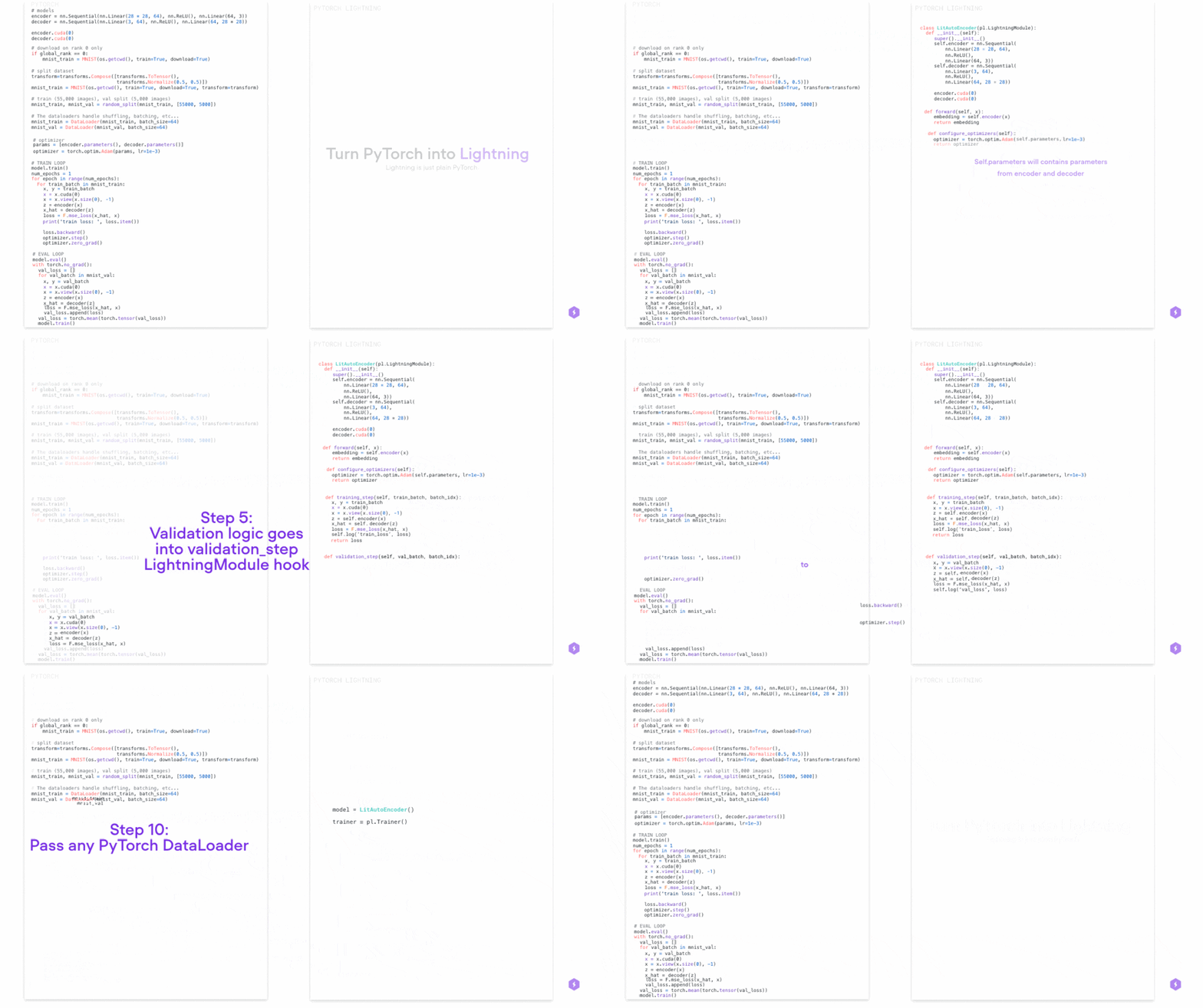
## PyTorch Lightning is just organized PyTorch
Lightning disentangles PyTorch code to decouple the science from the engineering.
______________________________________________________________________
## Lightning Design Philosophy
Lightning structures PyTorch code with these principles:
<div align="center">
<img src="https://pl-bolts-doc-images.s3.us-east-2.amazonaws.com/philosophies.jpg" max-height="250px">
</div>
Lightning forces the following structure to your code which makes it reusable and shareable:
- Research code (the LightningModule).
- Engineering code (you delete, and is handled by the Trainer).
- Non-essential research code (logging, etc... this goes in Callbacks).
- Data (use PyTorch DataLoaders or organize them into a LightningDataModule).
Once you do this, you can train on multiple-GPUs, TPUs, CPUs, HPUs and even in 16-bit precision without changing your code!
[Get started in just 15 minutes](https://lightning.ai/docs/pytorch/latest/starter/introduction.html)
______________________________________________________________________
## Continuous Integration
Lightning is rigorously tested across multiple CPUs, GPUs and TPUs and against major Python and PyTorch versions.
<details>
<summary>Current build statuses</summary>
<center>
| System / PyTorch ver. | 1.12 | 1.13 | 2.0 | 2.1 |
| :--------------------------------: | :---------------------------------------------------------------------------------------------------------: | ----------------------------------------------------------------------------------------------------------- | ----------------------------------------------------------------------------------------------------------- | ----------------------------------------------------------------------------------------------------------------- |
| Linux py3.9 [GPUs] | | | |  |
| Linux (multiple Python versions) |  |  |  |  |
| OSX (multiple Python versions) |  |  |  |  |
| Windows (multiple Python versions) |  |  |  |  |
</center>
</details>
______________________________________________________________________
## How To Use
### Step 0: Install
Simple installation from PyPI
```bash
pip install pytorch-lightning
```
<!-- following section will be skipped from PyPI description -->
<details>
<summary>Other installation options</summary>
<!-- following section will be skipped from PyPI description -->
#### Install with optional dependencies
```bash
pip install pytorch-lightning['extra']
```
#### Conda
```bash
conda install pytorch-lightning -c conda-forge
```
#### Install stable version
Install future release from the source
```bash
pip install https://github.com/Lightning-AI/lightning/archive/refs/heads/release/stable.zip -U
```
#### Install bleeding-edge
Install nightly from the source (no guarantees)
```bash
pip install https://github.com/Lightning-AI/lightning/archive/refs/heads/master.zip -U
```
or from testing PyPI
```bash
pip install -iU https://test.pypi.org/simple/ pytorch-lightning
```
</details>
<!-- end skipping PyPI description -->
### Step 1: Add these imports
```python
import os
import torch
from torch import nn
import torch.nn.functional as F
from torchvision.datasets import MNIST
from torch.utils.data import DataLoader, random_split
from torchvision import transforms
import pytorch_lightning as pl
```
### Step 2: Define a LightningModule (nn.Module subclass)
A LightningModule defines a full *system* (ie: a GAN, autoencoder, BERT or a simple Image Classifier).
```python
class LitAutoEncoder(pl.LightningModule):
def __init__(self):
super().__init__()
self.encoder = nn.Sequential(nn.Linear(28 * 28, 128), nn.ReLU(), nn.Linear(128, 3))
self.decoder = nn.Sequential(nn.Linear(3, 128), nn.ReLU(), nn.Linear(128, 28 * 28))
def forward(self, x):
# in lightning, forward defines the prediction/inference actions
embedding = self.encoder(x)
return embedding
def training_step(self, batch, batch_idx):
# training_step defines the train loop. It is independent of forward
x, _ = batch
x = x.view(x.size(0), -1)
z = self.encoder(x)
x_hat = self.decoder(z)
loss = F.mse_loss(x_hat, x)
self.log("train_loss", loss)
return loss
def configure_optimizers(self):
optimizer = torch.optim.Adam(self.parameters(), lr=1e-3)
return optimizer
```
**Note: Training_step defines the training loop. Forward defines how the LightningModule behaves during inference/prediction.**
### Step 3: Train!
```python
dataset = MNIST(os.getcwd(), download=True, transform=transforms.ToTensor())
train, val = random_split(dataset, [55000, 5000])
autoencoder = LitAutoEncoder()
trainer = pl.Trainer()
trainer.fit(autoencoder, DataLoader(train), DataLoader(val))
```
## Advanced features
Lightning has over [40+ advanced features](https://lightning.ai/docs/pytorch/stable/common/trainer.html#trainer-flags) designed for professional AI research at scale.
Here are some examples:
<div align="center">
<img src="https://pl-bolts-doc-images.s3.us-east-2.amazonaws.com/features_2.jpg" max-height="600px">
</div>
<details>
<summary>Highlighted feature code snippets</summary>
```python
# 8 GPUs
# no code changes needed
trainer = Trainer(max_epochs=1, accelerator="gpu", devices=8)
# 256 GPUs
trainer = Trainer(max_epochs=1, accelerator="gpu", devices=8, num_nodes=32)
```
<summary>Train on TPUs without code changes</summary>
```python
# no code changes needed
trainer = Trainer(accelerator="tpu", devices=8)
```
<summary>16-bit precision</summary>
```python
# no code changes needed
trainer = Trainer(precision=16)
```
<summary>Experiment managers</summary>
```python
from pytorch_lightning import loggers
# tensorboard
trainer = Trainer(logger=TensorBoardLogger("logs/"))
# weights and biases
trainer = Trainer(logger=loggers.WandbLogger())
# comet
trainer = Trainer(logger=loggers.CometLogger())
# mlflow
trainer = Trainer(logger=loggers.MLFlowLogger())
# neptune
trainer = Trainer(logger=loggers.NeptuneLogger())
# ... and dozens more
```
<summary>EarlyStopping</summary>
```python
es = EarlyStopping(monitor="val_loss")
trainer = Trainer(callbacks=[es])
```
<summary>Checkpointing</summary>
```python
checkpointing = ModelCheckpoint(monitor="val_loss")
trainer = Trainer(callbacks=[checkpointing])
```
<summary>Export to torchscript (JIT) (production use)</summary>
```python
# torchscript
autoencoder = LitAutoEncoder()
torch.jit.save(autoencoder.to_torchscript(), "model.pt")
```
<summary>Export to ONNX (production use)</summary>
```python
autoencoder = LitAutoEncoder()
input_sample = torch.randn((1, 64))
with tempfile.NamedTemporaryFile(suffix=".onnx", delete=False) as tmpfile:
autoencoder.to_onnx(tmpfile.name, input_sample, export_params=True)
```
</details>
### Pro-level control of optimization (advanced users)
For complex/professional level work, you have optional full control of the optimizers.
```python
class LitAutoEncoder(pl.LightningModule):
def __init__(self):
super().__init__()
self.automatic_optimization = False
def training_step(self, batch, batch_idx):
# access your optimizers with use_pl_optimizer=False. Default is True
opt_a, opt_b = self.optimizers(use_pl_optimizer=True)
loss_a = ...
self.manual_backward(loss_a, opt_a)
opt_a.step()
opt_a.zero_grad()
loss_b = ...
self.manual_backward(loss_b, opt_b, retain_graph=True)
self.manual_backward(loss_b, opt_b)
opt_b.step()
opt_b.zero_grad()
```
______________________________________________________________________
## Advantages over unstructured PyTorch
- Models become hardware agnostic
- Code is clear to read because engineering code is abstracted away
- Easier to reproduce
- Make fewer mistakes because lightning handles the tricky engineering
- Keeps all the flexibility (LightningModules are still PyTorch modules), but removes a ton of boilerplate
- Lightning has dozens of integrations with popular machine learning tools.
- [Tested rigorously with every new PR](https://github.com/Lightning-AI/lightning/tree/master/tests). We test every combination of PyTorch and Python supported versions, every OS, multi GPUs and even TPUs.
- Minimal running speed overhead (about 300 ms per epoch compared with pure PyTorch).
______________________________________________________________________
## Examples
###### Self-supervised Learning
- [CPC transforms](https://lightning-bolts.readthedocs.io/en/stable/transforms/self_supervised.html#cpc-transforms)
- [Moco v2 transforms](https://lightning-bolts.readthedocs.io/en/stable/transforms/self_supervised.html#moco-v2-transforms)
- [SimCLR transforms](https://lightning-bolts.readthedocs.io/en/stable/transforms/self_supervised.html#simclr-transforms)
###### Convolutional Architectures
- [GPT-2](https://lightning-bolts.readthedocs.io/en/stable/models/convolutional.html#gpt-2)
- [UNet](https://lightning-bolts.readthedocs.io/en/stable/models/convolutional.html#unet)
###### Reinforcement Learning
- [DQN Loss](https://lightning-bolts.readthedocs.io/en/stable/losses.html#dqn-loss)
- [Double DQN Loss](https://lightning-bolts.readthedocs.io/en/stable/losses.html#double-dqn-loss)
- [Per DQN Loss](https://lightning-bolts.readthedocs.io/en/stable/losses.html#per-dqn-loss)
###### GANs
- [Basic GAN](https://lightning-bolts.readthedocs.io/en/stable/models/gans.html#basic-gan)
- [DCGAN](https://lightning-bolts.readthedocs.io/en/stable/models/gans.html#dcgan)
###### Classic ML
- [Logistic Regression](https://lightning-bolts.readthedocs.io/en/stable/models/classic_ml.html#logistic-regression)
- [Linear Regression](https://lightning-bolts.readthedocs.io/en/stable/models/classic_ml.html#linear-regression)
______________________________________________________________________
## Community
The PyTorch Lightning community is maintained by
- [10+ core contributors](https://lightning.ai/docs/pytorch/stable/community/governance.html) who are all a mix of professional engineers, Research Scientists, and Ph.D. students from top AI labs.
- 680+ active community contributors.
Want to help us build Lightning and reduce boilerplate for thousands of researchers? [Learn how to make your first contribution here](https://medium.com/pytorch-lightning/quick-contribution-guide-86d977171b3a)
PyTorch Lightning is also part of the [PyTorch ecosystem](https://pytorch.org/ecosystem/) which requires projects to have solid testing, documentation and support.
### Asking for help
If you have any questions please:
1. [Read the docs](https://lightning.ai/docs/pytorch/stable).
1. [Search through existing Discussions](https://github.com/Lightning-AI/lightning/discussions), or [add a new question](https://github.com/Lightning-AI/lightning/discussions/new)
1. [Join our Discord community](https://discord.gg/VptPCZkGNa).